Back to blog
Recruitment leads: 10 best lead generation tools and tips
Andrea Lopez
· Updated
Share
Recruitment leads are companies that are likely to need help hiring soon, plus the people inside them who decide which agency gets the work, and recruitment lead generation is the process of finding them, reaching them and turning them into clients. The best recruitment leads come from hiring signals: job postings that stay open, new funding, fast headcount growth, a new leader, a new office or a contract won. Spot those signals early, reach the hiring manager with a relevant message and follow up across email, LinkedIn and phone.
Most agencies don't have a lead problem, they have a timing problem. They call companies when nothing is happening and stay quiet when a client suddenly needs ten engineers. This guide starts with the 10 best tools for recruitment leads, then covers how recruitment lead generation works: finding, listing, verifying and qualifying leads, turning them into clients, staffing agencies, outsourcing, 20 tips and a FAQ.
If you are building the whole new business function from scratch, read our playbook on lead generation for recruitment agencies. This post stays focused on the leads themselves.
The 10 best tools for recruitment leads in 2026
These are the best recruiter tools for lead generation: the ones recruitment agencies use most to find recruitment leads, get verified contact details and reach the people who hire. They are listed in the order we recommend them for client business development.
Tool | Best for | What it covers |
|---|---|---|
Enginy | Agencies that want one workflow for recruitment leads | AI search, waterfall enrichment, hiring signals, multichannel outreach, CRM sync |
LinkedIn Recruiter | Teams that live on LinkedIn | Search, InMail and candidate sourcing |
Apollo | Small agencies that want to start fast | B2B database, email and call sequences |
ZoomInfo | Established agencies selling to enterprise accounts | Company and contact intelligence, intent and hiring data |
Hunter.io | Solo recruiters who need emails | Email finder and verification |
Lusha | Quick lookups while researching | Emails and phone numbers through a browser extension |
Seamless.AI | High-volume contact research | Contact search and lists |
RocketReach | Precise searches by role and company | Contact database with detailed filters |
ContactOut | Recruiters who need personal and work contacts | Contact finder through a browser extension |
HubSpot Sales Hub | Agencies that want their CRM at the centre | CRM, email sequences and pipeline |
1. Enginy – All-in-one platform for multichannel recruitment prospecting
Enginy connects every step of working recruitment leads in one place. AI search finds the companies and decision-makers that match your ideal client profile, waterfall enrichment across 30+ data providers fills in verified emails and phone numbers, and buying signals such as hiring, job changes, funding and website visits tell you when to reach out.
Outreach runs from the same record: multichannel sequences over email, LinkedIn and calls, AI variables to personalize each message, a smart inbox for replies and CRM sync so every touch is logged.
Best for: agencies that want to stop switching between a data tool, an outreach tool and a spreadsheet for their recruitment leads.
2. LinkedIn Recruiter – Premium access to professional networks
LinkedIn Recruiter is LinkedIn's paid product for recruiters, with advanced search filters and InMail to contact people outside your network. It's built mainly for sourcing candidates, but agencies also use it to research hiring managers and talent leaders at target companies.
It stays inside LinkedIn, so you need other tools for verified emails, phone numbers, sequences and your CRM.
Best for: teams whose business development already runs mostly on LinkedIn.
3. Apollo – Lead database + multichannel outreach for recruitment teams
Apollo combines a large B2B contact database with built-in email and call sequences, lead scoring and CRM sync. Smaller agencies like it because they can search, build a list and start outreach on the same day.
Contact reveals work with credits, so costs grow with volume, and the data comes from a single database rather than several providers.
Best for: small agencies that want one affordable tool to start prospecting quickly.
4. ZoomInfo – Comprehensive B2B intelligence for recruitment agencies
ZoomInfo is one of the broadest B2B intelligence platforms: company and contact data, intent data, technographics and signals such as funding, headcount growth and job postings. Its engagement module adds email, dialing and sequences.
It's an enterprise purchase with custom contracts, which fits agencies with a dedicated business development team better than a boutique.
Best for: established agencies selling to large accounts with complex buying committees.
5. Hunter.io – Email finder and verification at scale
Hunter.io finds email addresses by company domain, shows the email pattern a company uses and verifies whether an address will deliver. Its browser extension surfaces emails while you research company websites.
It covers email only: no phone numbers, hiring signals or advanced multichannel sequences.
Best for: solo recruiters and small agencies that need clean email lists on a budget.
6. Lusha – Contact enrichment with one-click prospecting
Lusha gives you verified emails and phone numbers through a browser extension, so you can look up a contact in one click while researching a prospect. It syncs contacts to the main CRMs.
It works with credits, so heavy users need to watch usage, and it doesn't run outreach on its own.
Best for: recruiters who need quick, one-off contact lookups.
7. Seamless.AI – Real-time contact data for recruitment prospecting
Seamless.AI searches for contact details of the people you target and builds lists you can export to your CRM or outreach tool. Agencies use it to bulk up prospect lists for a sector or region.
Accuracy varies by country and role, so verify contacts before you send large campaigns.
Best for: agencies that need large volumes of contacts for list building.
8. RocketReach – Contact database with advanced search filters
RocketReach lets you search professionals by company, title, location and industry and returns emails and phone numbers where available. Its filters are useful when you need a specific role, such as heads of engineering at logistics companies.
Like most single databases, coverage is stronger in some markets than others.
Best for: targeted searches for specific decision-makers.
9. ContactOut – Recruiter-focused contact discovery tool
ContactOut finds emails and phone numbers through a browser extension and is popular with recruiters for both candidate and client outreach. It's simple to use and quick to set up.
It's a lookup tool: you'll still need a separate tool for sequences and tracking.
Best for: recruiters who want a lightweight contact finder.
10. HubSpot Sales Hub – Native CRM with built-in lead generation
HubSpot Sales Hub is a CRM with email sequences, meeting scheduling, pipeline tracking and reporting. For agencies, it keeps every recruitment lead, conversation and deal in one place.
It doesn't come with a contact database for prospecting, so most agencies pair it with a data and enrichment tool.
Best for: agencies that want their CRM at the centre of business development.
For a wider comparison, see our lists of recruitment lead generation software and prospecting tools for recruitment agencies.
How to choose recruiter tools for lead generation
Choose recruiter tools for lead generation by checking five things: data coverage in the countries you recruit in, verified direct phones, hiring signals, multichannel outreach and sync with your CRM or ATS. A tool that fails on coverage in your market is the wrong tool, however good it looks in a demo.
Use this checklist when you trial any of the tools above:
Data coverage in your countries. Test it with 20 real target companies from your niche and region and count how many decision-makers come back with a verified email.
Verified phones. Recruitment is still a phone business. Check how many direct dials and mobiles you get, and whether they reach the person or a switchboard.
Hiring signals. Can the tool tell you which companies are hiring, raising money, growing headcount or changing leaders, and alert you when it happens? Without signals you are back to cold lists.
Multichannel outreach. Email, LinkedIn and calls in one sequence, with replies on any channel stopping the rest. Otherwise you will message people who already answered.
CRM or ATS sync. Leads, contacts and activity should land in the system your consultants already use. Ask whether the sync is native, goes through middleware or is a CSV export, and test it with a few records before you commit.
Most agencies need tools for four jobs: finding companies and people, verifying contact data, tracking hiring signals and running outreach. You can combine several of the tools above (for example a contact finder, LinkedIn and a CRM) or use one platform such as Enginy that covers all four.
What recruitment leads are
In an agency, a recruitment lead is a potential client, not a candidate. It's a company that may need to fill roles it can't fill alone, and a named person there who can give you the brief: a hiring manager, a head of talent acquisition, an HR director or, in a small company, the founder.
A useful recruitment lead has three parts:
The company: it fits the sectors, sizes and regions where you place people.
The reason: something that suggests hiring is coming or already hurting (a signal).
The person: the decision-maker, with a verified email or phone number so you can actually reach them.
A company name on a spreadsheet is not a lead yet. "Series B fintech in Madrid, nine open engineering roles for 60 days, new CTO since September, here is her direct line" is.
What is recruitment lead generation?
Recruitment lead generation is the work of finding companies that will need to hire, identifying who decides there and starting a conversation that ends in a job order. It is business development on the client side of the desk, not candidate sourcing.
Lead generation in recruitment covers four steps: picking the companies worth targeting, spotting the moment they need help, reaching the right person with verified contact details, and following up until there is a brief or a clear "not now". Recruiting lead generation is the same thing under another name; staffing firms often call it new business or sales.
Recruitment lead generation vs candidate sourcing
Agencies use many of the same tools for both, which is why they get confused. The goal and the person you talk to are different.
Recruitment lead generation | Candidate sourcing | |
|---|---|---|
Who you look for | Companies and hiring decision-makers | People who could fill a role |
Goal | A new client, a job order, terms signed | A shortlist and a placement |
Signals that matter | Open roles, funding, growth, new leaders, expansion | Skills, experience, availability, location |
What you offer | Candidates, market knowledge, speed | A better job |
Who owns it | Business development, account managers, billing consultants | Recruiters and resourcers |
Inbound vs outbound recruitment lead generation
Outbound means you choose the company and reach out first: signal-based emails, calls and LinkedIn messages. Inbound means the company comes to you: a vacancy submitted on your website, a referral, an enquiry after a LinkedIn post. Outbound gives you control over who you target; inbound brings warmer leads at lower volume. Most agencies that grow steadily run both.
Active vs passive recruitment leads
Not all recruitment leads are in the same state, and you shouldn't talk to them the same way.
Type | What it looks like | How to approach it |
|---|---|---|
Active lead | Roles posted, a hiring deadline, a new team to build, a role reopened after a failed hire | Move fast. Offer a shortlist or a call this week. Speed beats polish. |
Passive lead | Growing, funded or expanding, but no urgent roles yet | Build the relationship. Share market data, salary benchmarks or a candidate profile. Stay visible. |
Dormant lead | Past client or past prospect that went quiet | Reconnect when a new signal appears, not on a fixed date. |
Active leads convert faster, but every agency sees the same job postings. Passive leads take longer, yet you face less competition because you showed up before the brief existed. A healthy pipeline has both.
Where to find recruitment leads: hiring signals
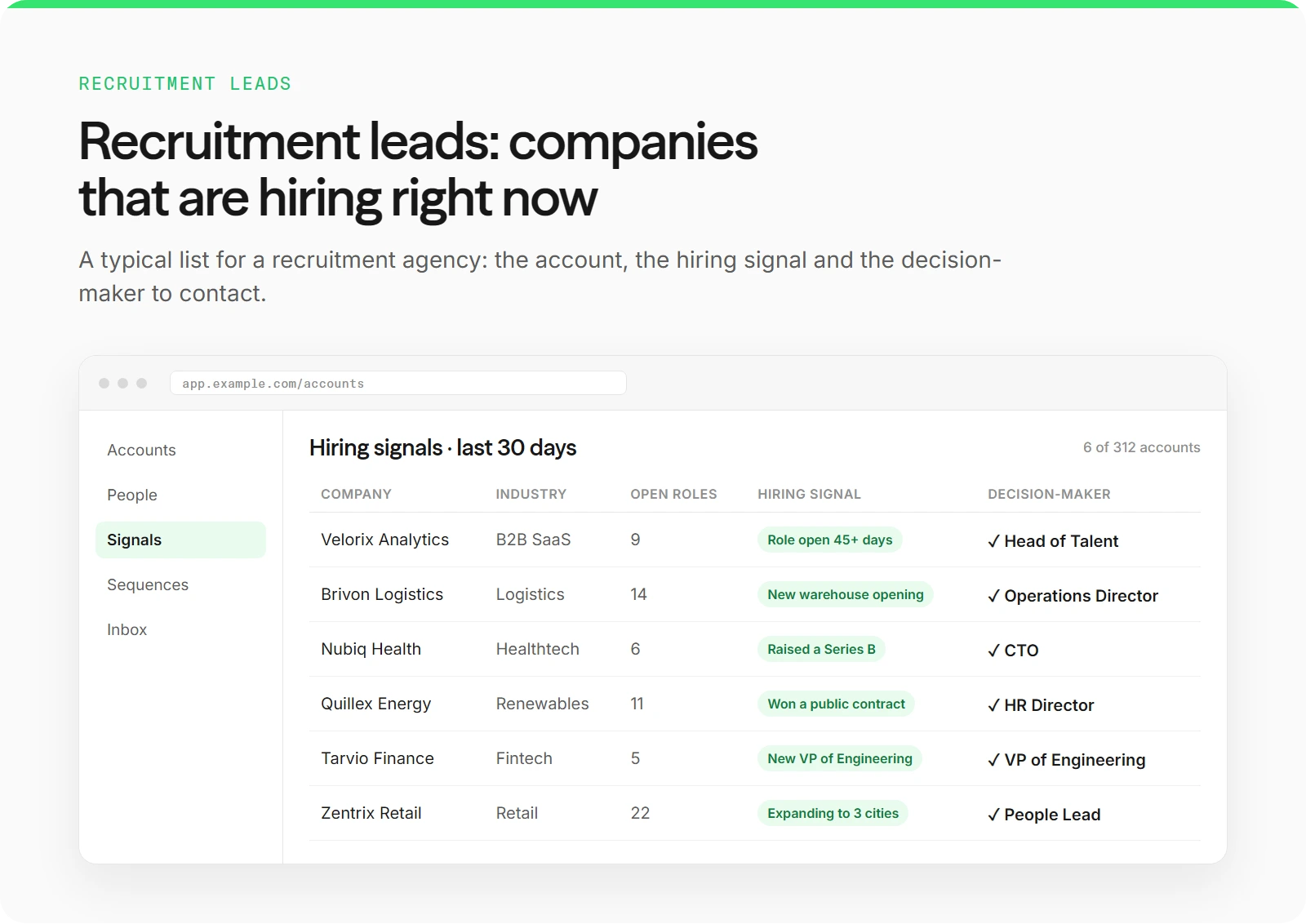
The strongest recruitment leads come from events that change a company's hiring needs. Here are the signals that matter most and why each one matters.
Job postings that stay open
A role posted once tells you little. A role that has been live for 45+ days, or reposted twice, tells you the internal team is struggling. Several similar roles at once (five sales reps, three data engineers) suggests a team build, which is where agencies add the most value.
What to watch: time open, number of similar roles, reposts, and roles in your niche.
New funding
A funding round usually comes with a hiring plan. Founders often say it in the announcement: "we'll use the money to grow the team". Seed and Series A companies tend to hire first leaders and generalists; later rounds bring volume hiring and new functions.
Timing tip: the first weeks after the announcement are the busiest. Reach out early, before the company is flooded with agency emails.
Headcount growth
Companies growing headcount fast (say, 20-30% in six months) usually hire faster than their internal recruiting team can handle. That's a clear opening for contract or volume recruitment.
New leadership and job changes
A new VP of Engineering, Head of Sales or CHRO often rebuilds the team in their first months. Job changes work the other way too: a hiring manager who used your agency at a previous company just moved to a new one. That's one of the warmest recruitment leads you will ever get, so track where your past contacts go.
Expansion to new offices or countries
Opening a new office or entering a new country means hiring people the company has no network for yet: a country manager, local sales, operations. If you recruit in that region, you are the local partner they don't have.
Contracts won and new projects
Public tenders, large customer wins and new projects create hiring needs with deadlines. Construction, engineering, IT services and consultancies often have to staff a project within weeks of winning it.
Website visitors
If a company visits your site, especially your sector pages or your "submit a vacancy" page, someone there is probably looking. Identify the company, find the right person and get in touch the same week.
Referrals and past clients
Your best source of recruitment leads is people who already trust you. Ask placed candidates who else is hiring in their new company. Ask happy clients for one name. Check in with past clients when they post new roles. Referrals close faster and argue less about fees.
Events
Industry conferences, local business events and sector meetups show you which companies are active in your niche. Use the exhibitor and speaker list as a starting point, then check each company for hiring signals before you reach out.
You can track these signals by hand with job boards, news alerts and company pages, but it takes hours a week. A platform that monitors buying signals such as hiring, job changes, funding and website visits does the watching for you. For more on reading signals in general, see our guide to B2B buying signals.
How to build a list of recruitment leads
A good list of recruitment leads is built from your niche and from hiring signals, not bought: start from the companies that are hiring for roles you fill, add the decision-maker with verified contact details and record why each company is on the list. Refresh it every week, because hiring signals go stale fast.
Where the leads come from
Source | What it gives you | Watch out for |
|---|---|---|
Job boards and company career pages | Who is hiring, for which roles, and for how long | Ads posted by other agencies hide the real employer |
Hiring-signal tools | Alerts on new roles, funding, headcount growth, new leaders and website visits | Signals only help if someone acts on them the same week |
B2B contact databases | Decision-makers and contact details at scale | Coverage varies by country; verify before sending |
Your CRM's lapsed clients and old prospects | Companies that already know you | Contacts may have moved on; check before you call |
Placed candidates and referrals | Warm introductions to new hiring managers | Ask at the right moment, not in the first week of a placement |
News, tenders and event lists | Funding, contracts won, expansion, active companies in your niche | Time-consuming to check by hand |
The best job lead database for your agency is the one that covers your niche and region with fresh data, so test it with your own target companies before choosing.
The columns a good lead list has
Column | Example | Why it matters |
|---|---|---|
Company | Acme Payments | The account you are trying to win |
Sector, size and region | Fintech, 120 people, Madrid | Checks fit with your niche |
Signal and date | 4 backend roles open since 2 September | The reason to call, and how fresh it is |
Open roles in your niche | Senior Go engineer, Python engineer | What you can offer to fill |
Decision-maker and title | Laura Gómez, VP Engineering | Who you are writing to |
Verified email and direct phone | Verified on 3 November | Whether you can actually reach them |
Second contact | Head of Talent Acquisition | The other person in the buying decision |
Relationship | Cold, referral or past client | Changes the message you send |
Score and next step | 7/8, call Thursday | Who gets worked first |
How often to refresh the list
Check signals weekly: new roles, roles still open after 30-45 days, funding and leadership changes. Re-verify contact details before every new campaign, and in any case every few months, because people change jobs and email addresses stop working. Remove companies that closed their roles internally, and move them to a nurture list rather than deleting them.
How to exclude other recruitment agencies from your lead lists
Agencies post many of the jobs you see, and they are not your clients. Filter out the staffing and recruiting industry in your data tool, exclude names and domains containing words such as "recruitment", "staffing", "talent" or "search", and keep a suppression list of known competitors that is checked before any contact is added. On job boards, hide agency postings where a filter exists and only count ads that name the real employer.
Verified leads for recruiters: how to check contact data
Verified leads for recruiters are client leads whose email has been checked as deliverable and whose phone reaches the person, not a switchboard. Verify before every campaign: bounced emails damage your sender reputation and wrong numbers waste your consultants' calling time.
What to check before outreach:
Bounce risk. Run every email through verification before it goes into a sequence. A common rule of thumb is to keep your bounce rate under 2%; above that, mailbox providers start to treat you as a careless sender.
Catch-all domains. Some mail servers accept every address, so a verifier can't confirm the person exists. Treat these emails as risky and send to them in small numbers.
Phone verification. Separate direct dials and mobiles from switchboard numbers. A number that reaches reception is not a verified lead.
Waterfall enrichment. Checking several data providers in sequence, known as waterfall enrichment, finds more verified emails and direct phones than any single database. Enginy runs waterfall enrichment across 30+ data providers for this.
When to re-verify. Before each new campaign, when a contact hasn't been touched for a few months, and whenever a job change signal appears.
Verification also keeps you inside the bulk sender rules Gmail and Yahoo introduced in 2024: senders need SPF, DKIM and DMARC set up, an easy unsubscribe and a low spam complaint rate. Our guide to improving email deliverability covers the setup.
How to qualify and prioritize recruitment leads
You'll find more recruitment leads than you can work. Qualifying them keeps your team on the ones that can become fee-paying clients.
Ask four questions for each lead:
Fit: is it in your niche (sector, role type, seniority, region)? A great lead outside your expertise is a bad lead for you.
Need: is there a signal, and how strong is it? Nine open roles beat one.
Access: do you know who decides, and can you reach them with a verified email or phone?
Value: what could it be worth? Senior permanent hires, a team of contractors or a retained search are worth very different amounts.
A simple scoring table helps you decide who gets a call today:
Criterion | 0 points | 1 point | 2 points |
|---|---|---|---|
Fit with your niche | Outside it | Adjacent | Core niche |
Hiring signal | None | One signal | Several signals or urgent roles |
Decision-maker found | No | Name only | Name + verified contact |
Relationship | Cold | Some connection | Past client or referral |
Leads with 6-8 points go to the top of the list. Leads with 3-5 go into a nurture sequence. Below 3, park them until a new signal appears. Our lead scoring guide goes deeper if you want to automate this.
The buying committee: who decides on an agency
In a small company the founder decides. In a mid-size company the hiring manager usually picks the agency and HR handles terms. In a large company talent acquisition runs a preferred supplier list, procurement negotiates fees and the hiring manager can push for an agency they trust. Map at least two people per account: the person who feels the open role and the person who signs off agencies.
HR lead generation: selling to HR and talent leaders
HR lead generation means targeting the people who own hiring as a function: CHROs, HR directors, heads of talent acquisition and people partners. They think in hiring plans, budgets, time-to-hire and supplier performance, not in one open role, so the message has to be different from the one you send a hiring manager.
Lead with the plan, not the vacancy. "You have 14 open roles across three teams" lands better than "I saw your Python role".
Offer data they can use internally. Salary benchmarks, time-to-fill for their roles in their region and candidate availability help them argue for budget.
Ask about the supplier list. When is it reviewed, what do they measure, and what made them drop an agency before?
Make it easy to try you. Propose one hard-to-fill role as a test instead of asking for a place on the list straight away.
Work HR and the hiring manager in parallel and keep both in the same account record.
How to generate sales leads in recruitment, step by step
To generate sales leads in recruitment, define your ideal client, track hiring signals, build a verified list, prioritize it, and run a short multichannel sequence that offers something concrete until a meeting is booked. These eight steps take you from a blank page to a meeting in the diary.
Define your ideal client profile. Sector, company size, region, roles you fill and the type of work (permanent, contract, retained). Write down the three to five job titles that buy from you.
Pick your hiring signals. Choose the two or three signals that best predict demand in your niche, for example roles open 45+ days and new funding for tech, or contracts won for engineering.
Build the account list. Pull the companies that match your profile and show those signals, and exclude other agencies and companies on preferred supplier lists you can't get onto.
Find and verify the decision-makers. Add at least two contacts per account, with verified emails and direct phones.
Score and prioritize. Use fit, signal strength, access and value. Work the top scores this week.
Write a message tied to the signal. Name the signal, show you know their market and offer something concrete: candidates, a salary benchmark, a view on the role.
Run a multichannel sequence. Five to seven touches over two to three weeks across email, LinkedIn and phone, stopping as soon as someone replies.
Book the meeting and log everything. Agree a call with a clear agenda, log the outcome in your CRM and move leads that aren't ready into nurturing.
For the full strategy behind this (team structure, targets, channels and how to measure the function), see our playbook on lead generation for recruitment agencies.
How to turn recruitment leads into clients
Finding recruitment leads is half the job. Turning them into job orders depends on what you say, when you say it and how you follow up.
The first message
Lead with their signal and something useful, not with your agency's history. A good first message is short, specific and easy to answer.
Example email to a hiring manager:
Subject: your 4 open backend roles
Hi Laura, I saw Acme has had four backend roles open since September, around the time you joined as VP Engineering. We place senior Go and Python engineers in Madrid and Barcelona, mostly from fintech.
Two engineers I'm working with would fit your stack and are interviewing now. Worth a 15-minute call this week to see if they're relevant?
Why it works: it names a real signal, shows you know the niche and offers something concrete (candidates) instead of asking for a meeting about "your hiring needs".
The follow-up
Most replies come after the second or third touch. Plan a short multichannel sequence over two to three weeks:
Day | Channel | What to send |
|---|---|---|
1 | First message tied to the signal | |
3 | Connection request with a short note, no pitch | |
6 | Phone | Call; if no answer, a short voicemail referring to the email |
9 | Something useful: a salary benchmark for the role or an anonymized candidate profile | |
14 | Brief message reacting to news from their company | |
18 | Polite close: "Should I check back next quarter?" |
Run this from one place so a reply on any channel stops the sequence. Multichannel sequences and a smart inbox that collects replies keep you from messaging someone who already answered.
The first call
When the lead agrees to talk, don't pitch for 15 minutes. Ask questions:
Which roles are hardest to fill right now, and why?
What happened with the last hire for this role?
How do you work with agencies today? What has gone wrong before?
Who else is involved in choosing an agency?
What would a good first month with a new agency look like?
Close with a clear next step: a role to work on, a terms discussion or a shortlist by a date. A call that ends with "let's stay in touch" is a nurture lead, not a client.
Nurturing recruitment leads that aren't ready yet
Most recruitment leads aren't hiring the week you contact them. Nurture them with something useful every few weeks and a fresh reason to talk whenever a new signal appears, so you are the first agency they think of when the brief arrives.
Segment by reason. Leads that said "not now", leads that never replied and lapsed clients need different messages.
Send value, not check-ins. A quarterly salary guide for their roles, a short note on candidate availability or an anonymized profile beats "just checking in".
Let signals restart the conversation. A new role, funding or a new leader moves a nurture lead back into an active sequence straight away.
Keep the cadence light. One useful touch every four to six weeks, with an owner and a next date in the CRM.
Our guide to lead nurturing automation shows how to run this without doing it by hand.
Lead generation for staffing companies and agencies
Lead generation for staffing companies is about volume, speed and account penetration: temp and contract work comes in rolling requisitions, so the goal is to become a regular supplier at a site or account and then spread to other sites and departments.
Staffing agencies differ from permanent recruitment agencies in a few ways that change how you find and work leads:
Staffing and temp agencies | Permanent recruitment agencies | |
|---|---|---|
Type of demand | Rolling requisitions, seasonal peaks, shift cover | One-off roles, team builds, senior hires |
Who buys | Site managers, operations managers, procurement | Hiring managers, HR, founders |
Best signals | New sites and warehouses, contracts won, seasonal peaks, high-volume postings | Roles open for long, funding, new leaders |
What wins | Speed, fill rate, compliance, local availability | Candidate quality, niche knowledge |
Growth path | More sites, more shifts, more departments in the same account | More roles with the same hiring manager |
What works in practice:
Target sites, not just head offices. A logistics company with ten warehouses can be ten separate leads, each with its own site manager.
Watch volume postings. Many identical roles in one location (pickers, drivers, call centre agents) is the clearest staffing signal there is.
Win one site, then expand. Use a good fill rate at one site as the reason to talk to the next, and find out when procurement reviews its supplier list.
Answer fast. In temp staffing the agency that sends suitable workers first usually wins the order.
Lead generation companies vs tools for recruitment agencies
Lead generation companies for recruitment agencies run outreach for you and book meetings; lead generation tools let your own team do it. Outsourcing makes sense when you need meetings quickly and have no one to do outreach; in-house tools make more sense when you want to own the data, the message and the relationships over time.
Outsourced lead generation company | In-house tools | |
|---|---|---|
What you get | Booked meetings or a qualified lead list | Data, signals and outreach your team runs |
Speed to start | Fast, if the provider knows recruitment | Depends on your team's time |
Control of the message | Shared; the provider writes in your name | Full |
Who owns the relationships | Partly the provider | Your consultants |
Knowledge of your niche | Usually generic at first | Your own |
Best for | Agencies without anyone doing business development | Agencies with consultants who sell |
What to ask an outsourced provider before signing:
Which recruitment agencies have they worked with, and in which niches?
Where does their contact data come from, and how is it verified?
What counts as a qualified meeting, and what happens if the meeting doesn't fit?
Who writes the messages, and do you approve them before they go out?
Which domains and inboxes will they send from, and who owns them afterwards?
Do you keep the full list of leads, replies and notes when the contract ends?
The main risks: messages that don't sound like you, damage to your main domain's reputation, meetings that don't fit your niche, and leads that leave with the provider. Whatever you choose, keep the data and conversation history in your own CRM.
20 recruitment lead generation tips and ideas
Here are 20 recruitment lead generation tips and ideas, grouped by where they help most. Start with two or three and add more once they are running.
Signals
Watch roles that stay open. Set a rule: any role in your niche open for 45+ days gets a call.
React to funding news fast. Keep a funding message template ready so you can reach out within days, before the inbox fills up.
Follow past contacts when they change jobs. A former client in a new role is a recruitment lead you can reach in their first week.
Treat website visits as a signal. A company that reads your sector pages or your vacancy form is probably looking. Contact the right person there the same week.
Outreach
Pick one niche and own it. "Tech recruitment" is too broad. "Data engineers for fintech in Spain" gives you a short list of companies and a sharper message.
Market candidates, not your agency. A strong anonymized profile sent to the right hiring manager opens more doors than a capabilities deck.
Personalize at scale. Use the signal, the role and the company's context in every message. AI variables can write the personal line for each lead so you don't have to do it 200 times.
Mix channels and keep calling. Combine email, LinkedIn and phone in one sequence. To avoid cold calls, call only leads that opened or replied; our cold calling strategies help when you do.
Inbound and content
Share market data. Salary benchmarks or time-to-hire data for their roles gives passive leads a reason to reply.
Post on LinkedIn about your niche. Short posts on salaries, candidate availability and hard-to-fill roles attract hiring managers, and are one of the main ways to generate leads without cold calling.
Make it easy to submit a vacancy. A clear "submit a vacancy" page with a short form, linked from every sector page, turns visitors into enquiries.
Respond to inbound enquiries within minutes. Speed to lead matters: an enquiry answered the same hour is far more likely to become a conversation than one answered tomorrow, and the company may be asking other agencies too.
Referrals and network
Track your placed candidates. Every person you place is a future hiring manager; check in at 30 and 90 days and ask who else is hiring.
Ask every happy client for one referral. One name, at the moment they thank you for a placement.
Use events as lists. Take exhibitor and speaker companies, check them for signals, then reach out before and after the event.
Partner with non-competing agencies. An agency that recruits finance roles and one that recruits tech can pass each other leads from shared clients. Agree the rules in writing.
Process
Build your own list, don't buy one. A list built around your niche and signals tells you who to call and why; refresh it weekly.
Verify before every campaign. Clean emails and direct phones protect your sender reputation and your consultants' time.
Exclude agencies and existing clients. Keep suppression lists so you never pitch a competitor or cold-email a client another consultant already manages.
Log everything in one place. If a consultant leaves, their leads stay. CRM sync does it automatically.
Common mistakes with recruitment leads
Emailing generic HR inboxes. They rarely reply. Find the hiring manager.
Chasing every job posting. Large companies with in-house teams and preferred supplier lists are hard to win. Look for gaps: urgent, hard-to-fill or brand-new roles.
Talking about your agency instead of their problem. "We are a leading recruitment firm" gets deleted.
Giving up after one email. Most conversations start after several touches on more than one channel.
Ignoring passive leads. The companies that will hire next quarter are the ones to warm up now.
Frequently asked questions about recruitment leads
What are the best tools for recruitment leads?
The best tools for recruitment leads in 2026 are Enginy, LinkedIn Recruiter, Apollo, ZoomInfo, Hunter.io, Lusha, Seamless.AI, RocketReach, ContactOut and HubSpot Sales Hub. Enginy covers the whole flow in one place (finding accounts, verified contacts, hiring signals and multichannel outreach), while the others are strongest at one part of it, such as contact data, LinkedIn search or the CRM.
What are recruitment leads?
Recruitment leads are potential clients for a recruitment or staffing agency: companies likely to need help hiring, and the decision-makers inside them, such as hiring managers, heads of talent or founders. A good lead combines a company that fits your niche, a reason to hire now and a contact you can reach.
How do I generate recruitment leads?
Start from hiring signals: job postings that stay open, new funding, headcount growth, new leaders, expansion and contracts won. Add referrals from past clients and placed candidates, event lists and website visitors. Then find the decision-maker, verify their contact details and reach out with a message tied to the signal.
How can recruitment agencies generate leads without cold calling?
Use warm channels: referrals from clients and placed candidates, LinkedIn posts about your niche, salary reports and market data that hiring managers ask for, a clear "submit a vacancy" page and signal-based emails. When you do call, call leads that already opened or replied, so the call is expected.
What are the best job lead databases for recruitment agencies?
The best job lead database is the one that covers your niche and region with fresh data. Free sources include job boards, company career pages, funding news, public tenders, event lists and your own past clients. Hiring-signal tools and B2B databases save the hours of checking them by hand. Test any database with 20 of your real target companies before you choose.
What is the difference between active and passive recruitment leads?
Active recruitment leads are hiring right now, with open roles or urgent needs, so speed matters. Passive leads show signs of future hiring, like funding or growth, but have no urgent roles yet. You win them by building the relationship early and staying useful until the brief appears.
What are the best hiring signals for recruitment leads?
The most reliable hiring signals are roles open for more than 45 days, several similar roles at once, new funding, fast headcount growth, a new leader in a function you recruit for, a past contact joining a new company, new offices or countries, and large contracts won. Several signals together make a stronger lead than one.
What are verified leads for recruiters?
Verified leads for recruiters are client leads whose contact details have been checked: the email is deliverable and the phone number reaches the person, not a switchboard. Checking several data providers in sequence (waterfall enrichment) finds more verified contacts than one database alone.
How do I exclude other recruitment agencies from my lead lists?
Filter out the staffing and recruiting industry in your data tool, exclude company names and domains with words like "recruitment", "staffing" or "talent", and keep a suppression list of known agencies. On job boards, hide agency postings where a filter exists and only count ads that name the real employer.
Can recruitment lead generation software integrate with my ATS or CRM?
Most recruitment lead generation software syncs with common CRMs, and many recruitment CRMs and ATSs offer an API or connectors. Ask each vendor whether the sync is native, goes through middleware or is a CSV export, and test it with a few records. Enginy syncs contacts and activity with your CRM.
What is speed to lead in recruiting?
Speed to lead is the time between an inbound enquiry (a vacancy submitted, a reply, a form filled) and your first response. In recruiting it matters because companies often ask several agencies at once, so the first useful answer usually wins the conversation. Aim to reply within the hour.
Who should I contact at a company: HR or the hiring manager?
Usually the hiring manager first, because they feel the pain of the open role and often influence which agency is used. In larger companies, talent acquisition or HR manages agency relationships, so you'll need them too. In small companies, the founder or CEO often decides.
How many follow-ups should I send to a recruitment lead?
Five to seven touches over two to three weeks, across email, LinkedIn and phone, is a reasonable range. Each touch should add something: a candidate profile, a salary benchmark or a note on company news. Stop as soon as the lead replies on any channel.
Should I buy lists of recruitment leads?
Bought lists are usually generic, out of date and shared with other agencies. You'll get better results building your own list from your niche and hiring signals, then verifying the contacts. A list built around signals tells you who to call and why, which a bought list can't.